Great cup of coffee with a foamy head!
"This is my second Jura for a 2nd home. The only other option was to haul it back and forth since I won't accept using any other machine. No repair issues ever."

Checkout using your account
This form is protected by reCAPTCHA - the Google Privacy Policy and Terms of Service apply.
Checkout as a new customer
Creating an account has many benefits:
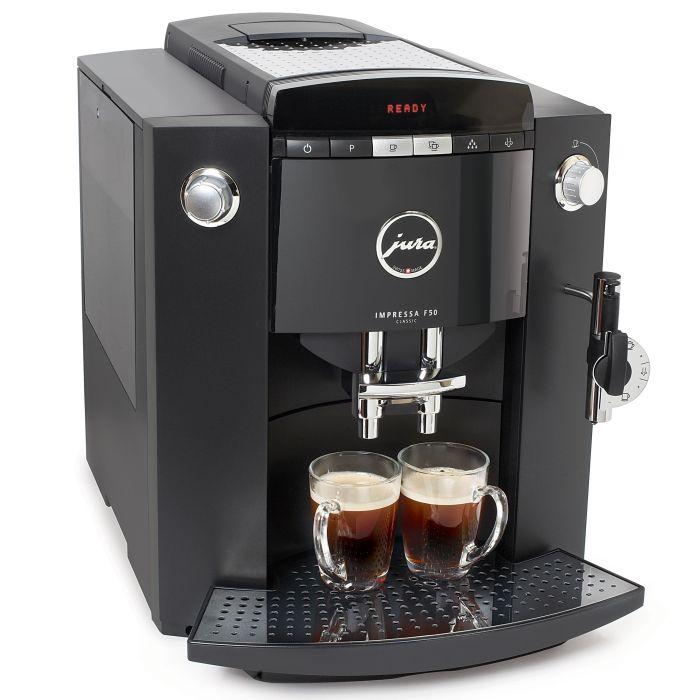
The Refurbished Jura IMPRESSA F50 Classic is a multipurpose coffee maker that offers easy preparation of espresso, cappuccino, coffee, latte or macchiato. It features a built in grinder and its operation is controlled by a intuitive rotary switch and LED text display.
Call Us for Expert Advice! 800-709-8210

Features of the Jura Impressa F50 Classic Super Automatic Coffee Center:
Convenience, Monitoring, Appearance and Safety Features:
Programming
Your Jura Capresso IMPRESSA F50 espresso machine and coffee center makes it easy to customize coffee settings to your liking. When the machine is on and the display shows READY, push and hold the P-button until the display shows FILTER. This indicates that you are in programming mode. Turn the left rotary dial clockwise and the F50 will guide you through 11 programming and look-up functions: FILTER, HARDNESS, AROMA, TEMPERATURE, TIME, AUTO-ON, AUTO-OFF, STATS, LANGUAGE, ML / OZ. AND 24 HR AM/PM).
Once you select a function, just press the button inside the dial and the display will show you the options for this function. Dial the option you want and push the button to confirm. Push the P-button to get back to making coffee, indicated by READY in the display.

Features of the Jura Impressa F50 Classic Super Automatic Coffee Center:
Convenience, Monitoring, Appearance and Safety Features:
Programming
Your Jura Capresso IMPRESSA F50 espresso machine and coffee center makes it easy to customize coffee settings to your liking. When the machine is on and the display shows READY, push and hold the P-button until the display shows FILTER. This indicates that you are in programming mode. Turn the left rotary dial clockwise and the F50 will guide you through 11 programming and look-up functions: FILTER, HARDNESS, AROMA, TEMPERATURE, TIME, AUTO-ON, AUTO-OFF, STATS, LANGUAGE, ML / OZ. AND 24 HR AM/PM).
Once you select a function, just press the button inside the dial and the display will show you the options for this function. Dial the option you want and push the button to confirm. Push the P-button to get back to making coffee, indicated by READY in the display.
Join 1st in Coffee’s mailing list
and we’ll keep in touch with new products and special offers